bardecode.com
barcode reading software
  • Home
  • Download
  • Purchase
  • Pricing
    • Windows SDK Price List
    • Windows SDK with PDF Extension Price List
    • PDF Extension For Windows Price List
    • Linux SDK Price List
    • Mobile SDK Price List
    • BardecodeFiler Price List
    • Licensing
  • Products
    • Barcode Reader Toolkit for Windows
    • Barcode Reader Toolkit for Linux
    • Barcode Reader Toolkit for Mobile Platforms
    • BardecodeFiler Application
    • Softek Barcode Maker Component for .Net
    • Aquaforest’s Autobahn DX
  • Knowledge Base
    • Documentation
    • Specifications
  • News
  • Contact
    • About Us
    • Resellers
    • Links
Select Page ...

News

Reading Barcodes in VB.Net

admin November 27, 2012 Software Development Kits No Comments

Using the Softek Barcode Reader SDK to read barcodes from images in a VB.Net project is very straight foward and this article should get you up and running in under 15 minutes…

Step 1.

Download the barcode reader sdk from here

If you are using a 64-bit system and want to handle PDF documents then please run REGISTER.BAT in the x86 folder before you continue.


Step 2.

Open your VB.Net project in Visual Studio or start a Windows Forms Application if you are starting from scratch.


Step 3.

Add a reference to the SoftekBarcodeLib3.dll…

Select Add Reference from the Project menu:
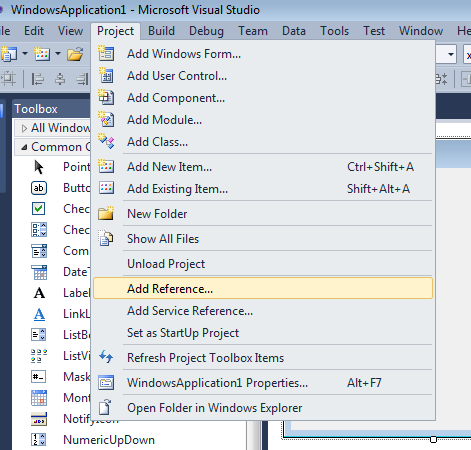
vbdotnet1 Reading Barcodes in VB.Net


Then browse to the installation folder for the Softek Barcode Reader SDK and open the “anycpu” folder and select SoftekBarcodeLib3.dll:
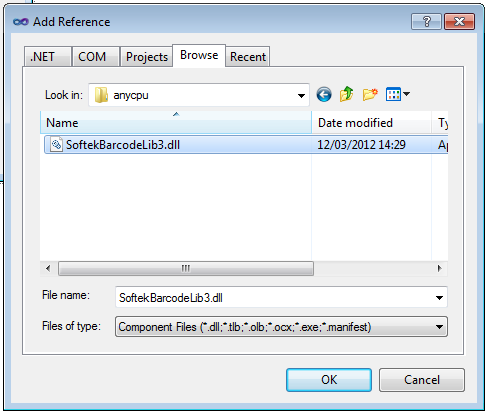
vbdotnet2 Reading Barcodes in VB.Net

Take a note of the location of the folder where the SDK is installed (not including the anycpu folder)


Step 4.

In the function where you want to read the value of a barcode from an image add the following code:

        Dim barcode As SoftekBarcodeLib3.BarcodeReader

        Try
            barcode = New SoftekBarcodeLib3.BarcodeReader("\path\to\the\sdk\installation\folder")
        Catch ex As System.DllNotFoundException
            MessageBox.Show("Could not locate the Softek Barcode Reader SDK Installation Folder")
            Return
        End Try

        barcode.MultipleRead = True

        Dim nBarCodes As Integer

        nBarCodes = barcode.ScanBarCode("somefile.tif")

        Dim i As Integer

        For i = 1 To nBarCodes
            MessageBox.Show("Found barcode with value " & barcode.GetBarString(i))
        Next


Step 5.

That’s it – all done. But don’t forget that there is a lot more to the sdk than just this. If you have any questions then please contact support@bardecode.com . Don’t forget we have lots of sample images under the toolkit installation folder and it’s always a good idea to try these first before your own images.

You also might wish to add some extra lines of code to turn on or off various barcode types and maybe set a license key:

barcode.ReadQRCode = True

barcode.LicenseKey = “MY LICENSE KEY”

← Reading Barcodes with Delphi using win32 dll
Codabar start/stop characters →
admin

  • Search

  • Quick Download

    • SDK + PDF for Windows (ZIP)
    • SDK + PDF for Windows (EXE)
    • SDK for iPhone and Android
    • BardecodeFiler
    • Barcode Maker for .net
    • Autobahn DX
    • SDK for Linux x86/x64
    • SDK for Angstrom ARM
    • SDK for Apple OS X (intel)
    • SDK for Apple OS X (ppc)
    • SDK for Solaris Sparc
    • SDK for Solaris x86
    • Code 39 TTF Font
  • Categories

    • Knowledge Base
      • Barcode Specification
      • BardecodeFiler
      • Documentation
      • Image
      • Settings
      • Software Development Kits
    • News
      • Blog
      • Cormorant RT
    • Uncategorized
  • Archives

    • April 2013
    • February 2013
    • January 2013
    • December 2012
    • November 2012
    • October 2012
    • September 2012
    • August 2012
    • July 2012
    • April 2012
    • March 2012
    • December 2011
    • September 2011
    • August 2011
    • December 2010
    • September 2010
    • July 2010
    • March 2010
    • February 2010
    • January 2010
    • December 2009
    • October 2009
    • August 2009
    • April 2009
    • January 2009
    • November 2008
    • October 2008
    • August 2008
    • March 2008
    • January 2008
    • June 2007
    • March 2007
    • February 2007
    • October 2006
    • June 2006
    • March 2006
    • January 2006
    • September 2005
    • January 2005
    • September 2004
    • Copyright © 2013 Softek Software Ltd. All Rights Reserved